

If you’ve been going back and forth between Squarespace and WordPress for your business website, you’re not alone. It’s one of the most common questions we hear from small business owners who are ready to invest in their online presence. Both platforms promise beautiful websites. Both are technically capable. So how do you choose?
The short answer: it depends on what you want your website to actually do for you. If you want something quick and simple to set up yourself, Squarespace has real appeal. But if you want a website that grows with your business, ranks well on Google, and doesn’t box you in, WordPress is almost always the stronger choice. Here’s why.
What Squarespace and WordPress Actually Are
Before we compare them side by side, it helps to understand what each platform is built to do.
Squarespace is an all-in-one website builder. You pay a monthly subscription, and it handles your hosting, design templates, and technical maintenance all in one place. It’s designed to be accessible for people who aren’t tech-savvy, with a drag-and-drop editor and a curated set of templates.
WordPress (specifically WordPress.org, the self-hosted version) is an open-source content management system that powers over 40% of all websites on the internet. You install it on your own hosting, choose from thousands of themes, and extend its functionality through plugins. It has a steeper initial learning curve, but the flexibility and power it offers are in a completely different league.
Where Squarespace Falls Short for Growing Businesses
Squarespace looks great out of the box. That’s its biggest selling point. But for businesses that are serious about growth, especially growth through search, those polished templates come with some real limitations.
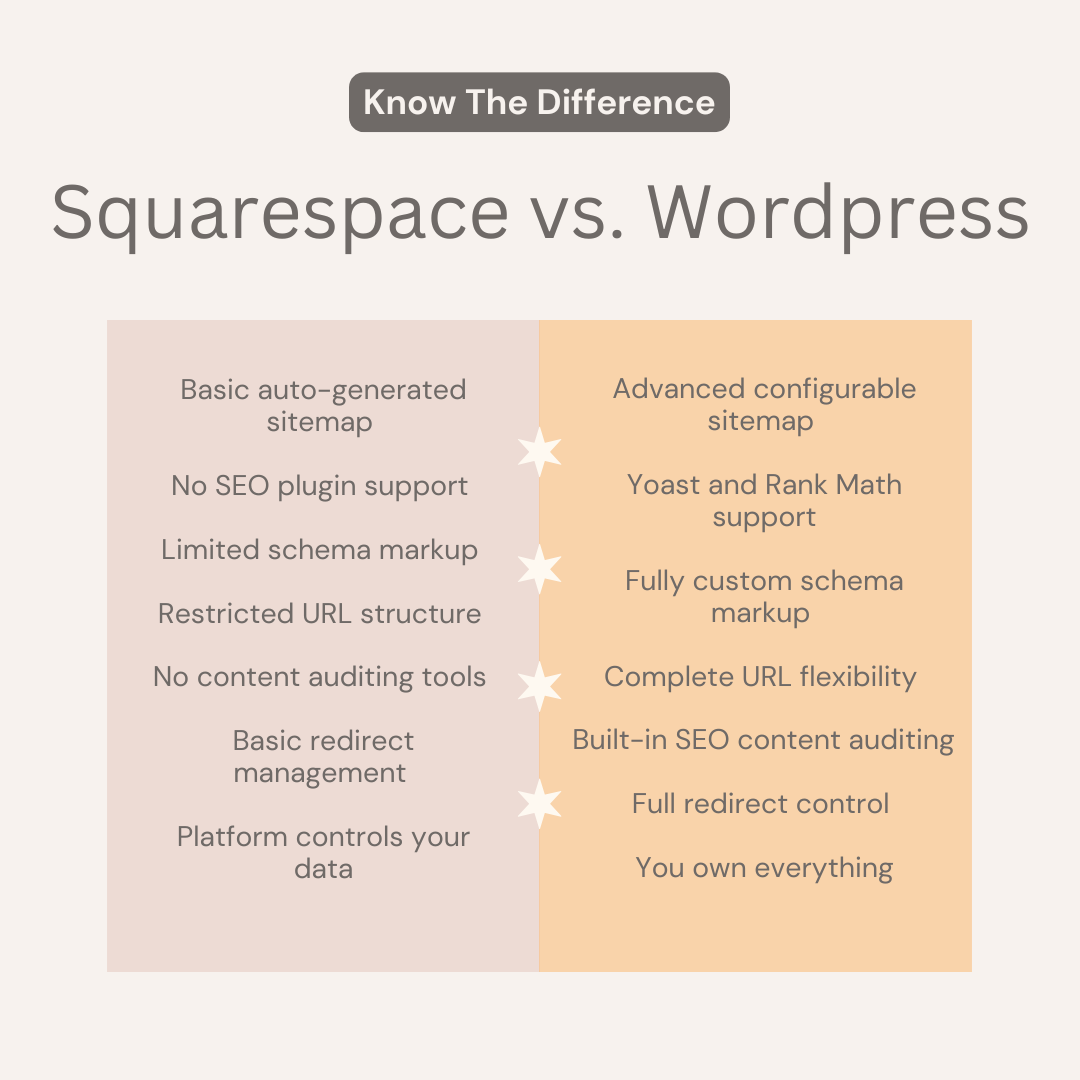
SEO Flexibility Is Limited
Squarespace has basic SEO features built in. You can edit page titles, meta descriptions, and alt text. But when it comes to the deeper technical SEO work that helps your site rank, things start to get restrictive.
You can’t install third-party SEO plugins like Yoast or Rank Math, which give you granular control over how your content is structured and indexed. Schema markup, which helps search engines understand your business and can improve your appearance in search results, is limited and difficult to customize. URL structures are also less flexible, which can matter over time as your content library grows.
For any business trying to rank for competitive searches, those constraints can quietly hold your site back.
You’re Renting, Not Owning
This is a big one. With Squarespace, your website lives on their platform. You pay a monthly fee for access, and if Squarespace raises prices, changes its features, or shuts down a plan tier, you have limited options. Your content, design, and domain are tied to their ecosystem.
WordPress is different. Your site lives on your own hosting. You control it fully. You can move it, modify it, hand it to a different developer, or scale it in any direction without asking anyone’s permission.
Design Customization Has a Ceiling
Squarespace templates are beautiful, but you can only customize them so much. If your brand has a very specific vision, or if you want your website to stand out from every other business using the same template, you’ll eventually run into walls.
With WordPress, using a page builder like Elementor or Divi, you can design virtually anything. Every color, every layout, every interaction can be built exactly how your brand needs it.
E-Commerce and Booking Integrations Are More Limited
If you sell products, book appointments, or process payments through your website, your integration options matter. Squarespace’s native tools work fine for simple setups, but for more complex workflows like managing multiple service providers, membership tiers, or integrations with industry-specific software, you’ll quickly find yourself cobbling together workarounds instead of real solutions.
Why WordPress Wins for Small Businesses Focused on Growth
WordPress isn’t perfect. It requires a bit more setup and, ideally, a developer who knows what they’re doing when you first build the site. But for businesses that want a website that actively works for them, the advantages are significant.
Superior SEO Capabilities
WordPress is widely considered the best platform for SEO, and that reputation is earned. With plugins like Yoast SEO or Rank Math, you get full control over every on-page SEO element. You can configure XML sitemaps, set canonical URLs, control how your content appears in AI-powered search features, add custom schema markup for local businesses, and audit your content as you write it.
For any business trying to show up in Google searches before a potential customer takes action, this level of control is not optional. It’s the difference between a website that ranks and one that doesn’t.
Unlimited Customization
WordPress gives you access to thousands of themes and tens of thousands of plugins. Whether you need an advanced booking system, a membership portal, a multilingual site, or a custom-built feature no one has built before, WordPress can do it. Your website can grow in whatever direction your business needs, without ever hitting a ceiling.
You Own Everything
With WordPress, your website is yours. Your content, your design files, your data. You’re not locked into any company’s pricing or product decisions. That kind of ownership matters, especially when you’ve invested time, money, and SEO effort into building a strong online presence.
Better Blogging and Content Tools
If you’ve read about how blogging helps your SEO (and it absolutely does for service-based businesses), WordPress is simply built for it. The content editor, category and tag structure, internal linking tools, and SEO plugin integration make publishing and optimizing blog content far more efficient than Squarespace allows.
A Larger Developer and Designer Community
Because WordPress powers such a massive share of the web, finding a developer, designer, or SEO professional who knows it deeply is easy. If you ever need to switch agencies or bring someone new onto your project, WordPress makes that handoff seamless. You’re never dependent on one shop’s proprietary system.
Squarespace vs WordPress at a Glance
| Feature | Squarespace | WordPress |
|---|---|---|
| Ease of Setup | Very beginner-friendly | Requires setup; best with a developer |
| Design Flexibility | Beautiful but limited | Fully custom, no ceiling |
| SEO Capabilities | Basic built-in tools | Advanced with plugins like Yoast |
| Ownership | Platform-dependent | You own everything |
| Blogging Tools | Basic | Robust and SEO-ready |
| Plugin/Integration Options | Limited ecosystem | Tens of thousands of options |
| Scalability | Works for simple sites | Scales with any business |
| Cost Over Time | Predictable subscription | Variable; depends on hosting + developer |
When Squarespace Might Actually Make Sense
To be fair, Squarespace isn’t the wrong choice for everyone. If you’re a solo practitioner just starting out and you need a simple, professional-looking online presence fast, it can absolutely work as a starting point.
It’s also a reasonable option if you have no interest in blogging, aren’t targeting competitive search terms, and mostly just need a digital business card with a contact form and some photos.
But if you’re at the stage where you’re investing in your brand, thinking seriously about local SEO, or planning to grow your client base through your website, Squarespace tends to become a constraint you’ll eventually outgrow. Many business owners come to us after hitting exactly that ceiling, wanting to migrate to WordPress so they can finally do more.
What About Wix, Showit, or Other Builders?
Squarespace and WordPress are the two most common platforms we’re asked to compare, but you may have also come across Wix, Showit, or Webflow. Here’s a quick take:
- Wix: Similar to Squarespace in its all-in-one approach. More flexible drag-and-drop design, but SEO capabilities are still behind WordPress and the platform has historically had technical SEO issues.
- Showit: Popular with photographers and creatives for its visual design freedom. It actually runs blog content through WordPress, which is telling. Great for design-forward sites, but not ideal for businesses that need robust SEO and functionality.
- Webflow: A powerful tool for developers and designers, but overkill for most small service businesses and expensive to maintain without technical expertise.
For most small businesses, the decision really does come down to Squarespace vs. WordPress. And in that comparison, WordPress wins for businesses that are serious about growth.
Other Questions Business Owners Ask About Website Platforms
Can I migrate my Squarespace site to WordPress later?
Yes, but it’s not seamless. You can export content from Squarespace and import it into WordPress, but your design, SEO settings, and URL structure won’t carry over automatically. A migration done properly takes time and ideally involves a developer. It’s one of the reasons we recommend starting on the right platform rather than rebuilding later.
Is WordPress harder to maintain than Squarespace?
WordPress requires occasional updates to core software, themes, and plugins. On a managed WordPress hosting plan, many of those updates happen automatically. Working with a developer or agency that manages your site on an ongoing basis means you rarely have to think about maintenance at all. Squarespace handles updates for you, but that convenience comes with the trade-off of less control.
How much does a WordPress website cost compared to Squarespace?
A Squarespace subscription runs between roughly $16 and $49 per month depending on your plan. WordPress hosting typically costs $10 to $30 per month. But the real cost of a WordPress site includes design and development, which varies significantly based on who builds it and what you need. A professionally built custom WordPress site is an investment, but the long-term returns in organic traffic and lead generation typically far outpace the upfront cost.
Does my business need a blog if I have a service website?
If you want to rank organically on Google beyond just your homepage, yes. A blog lets you target the specific questions your ideal clients are already searching. For service-based businesses in competitive markets, a well-maintained blog can be one of the most valuable things you invest in. Learn more about how blogging supports your SEO strategy in our post on whether blogging still helps SEO in 2026.
What’s the best website platform for local SEO?
WordPress, without question. The combination of full technical SEO control, plugin support like Yoast, and the ability to structure your content and internal links strategically makes WordPress the platform of choice for businesses serious about ranking in local search results.
When It’s Worth Bringing in a Professional
Building your own website on either platform is possible. But if your goal is a site that converts visitors into clients and ranks well in search, DIY often costs more time (and eventually money) than it saves.
A professional web design team does more than make your site look good. They structure it for search, ensure your technical SEO foundation is solid, build it to load quickly on mobile, and make sure the design reflects the quality of your brand. No matter your industry or market, the quality of your website plays a direct role in whether potential customers choose you over a competitor.
If you’re wondering whether your current site is doing enough for you, a website audit is a great place to start. It will show you exactly where you’re losing visibility and what it would take to fix it.
The Bottom Line on Squarespace vs WordPress
Squarespace is a solid tool for getting a clean site up fast. But for small businesses that are serious about SEO, growth, and owning their digital presence, WordPress is the stronger platform by a wide margin. It gives you better SEO tools, more design freedom, full ownership of your content, and the flexibility to scale in any direction your business needs.
At Clementine Creative Studios, we build every client site on WordPress because we’ve seen firsthand what it does for visibility, lead generation, and long-term growth. It’s not just what we prefer. It’s what we believe gives our clients the best shot at building something that actually works.
If you’re ready to build or rebuild your website the right way, we’d love to take a look at where things stand. Request a free audit and let’s talk about what your site could be doing for your business.